Collision2MIDI
A handy tool to transfer object collisions to your favorite DAW and replace them with sounds of your preference, without worrying about timing.
This plugin consists of two parts, a MIDI Recorder object that acts as a Scene Collision Detector, MIDI Recorder and MIDI exporter, and a MIDI Tag.
The MIDI Tag can be assigned on any mesh object including Cloners and Voronoi Fracture objects. The Tag will only work if the assigned object has a Simulation or Bullet tag already on it.
Tag Attributes:
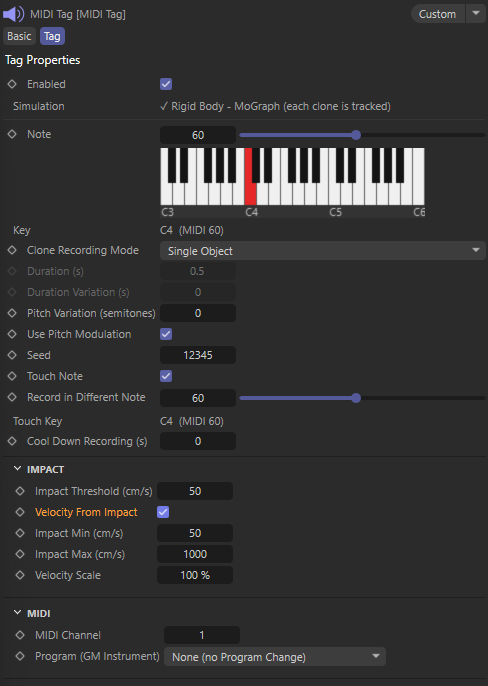
Enabled - Enables/Disables the tag.
Note - Here you can choose what MIDI note will be recorded from C-1 to G9 mapped on a 127 keys keyboard. By default it’s C4 (note 60). A helpful image shows the octave and key on the keyboard. An info text contains the name of the note and corresponding MIDI note.
If the tagged object is a Cloner there are two Clone Recording Modes to choose from.
1. Single Object - All instance collisions will be recorded with a single note.
2. By Child - Each child will be recorded as a different note ascending from the defined from Note.
Duration - Defines the duration of the note.
Duration Variance - Defines a variation in duration on the defined note.
Pitch Variation - Defines a variation factor when a collision is detected. This is interpreted as a variation in semitones from the defined note.
Use Pitch Modulation - Pitch Variation will be recorded as a modulation on the defined note.
Seed - A small change in the randomization algorithm used to define variations.
Touch Note - Defines the detection of a constant collision.
Record in Different Note - If a Touch is detected it will be recorded as a different note.
Cool Down Recording - Defines a duration filter from the last detected collision. It can be used to filter out too many fast collisions or collision accuracy errors.
Impact Threshold - Defines the velocity threshold needed to record the volume of the note.
Velocity from Impact - If enabled the velocity of an object affects the volume of the note.
Impact Min / Impact Max - Defines the minimum and maximum velocity needed to be eligible for recording the volume.
MIDI Channel - Defines on what MIDI channel the note will be recorded.
Program (GM Instrument) - Defines the MIDI instrument the note will be played on.
MIDI Recorder Attributes:
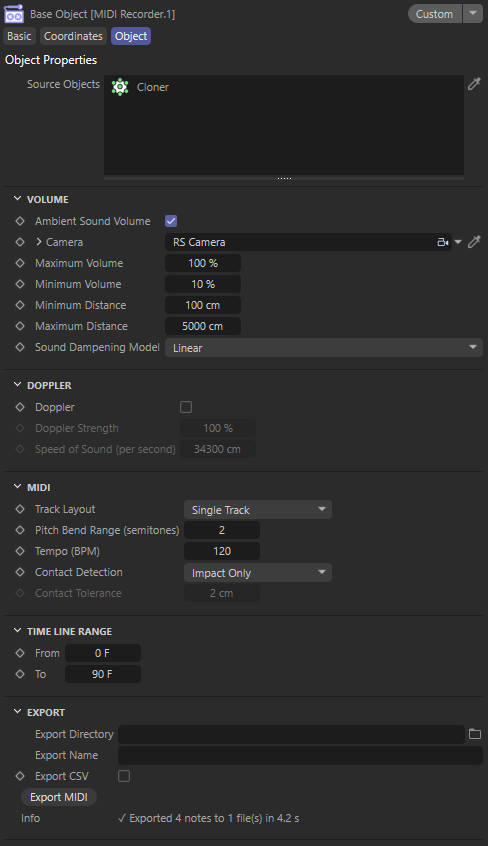
Source Objects - The list of tagged objects that will be recorded (tracked for collisions)
Ambient Sound Volume - Enables recording sound volume depending its distance from the camera.
Camera - Any type of camera including the Stage Objects, defines the active camera from which the object will be heard from and thus its distance computed for a correct sound volume.
Maximum Volume / Minimum Volume - Defines the minimum and maximum volume allowed for a note to have when recorded from the camera.
Minimum Distance / Maximum Distance - Defines a minimum and maximum distance from the Camera object where the collisions volume will be mapped too Min and Max Volume.
Sound Dampening Model - Defines a model from which the volume will be calculated depending the distance of an object from the Camera.
Doppler - If enabled the notes will be recorded with a pitch variation depending their movement in respect to the Camera.
Track Layout - Defines how notes will be exported in the MIDI file.
1. Single Track - All objects will be recorded in a single track and file.
2. Per Source - Each object will be recorded on its own MIDI file.
3. MPE - Objects will be recorded on layers on one file. Some DAWS don’t support MPE.
Contact Detection - Defines some mechanics on how to decide a collision. Impact Only is faster.
Time Line Range - Defines the time window in which the sound will be recorded.
Export Directory - The export folder address
Export Name - The name of the MIDI file. In the case of Per Source Track Layout each file will have the name of the object as a suffix on the title. If multiple objects have the same name their ID will be used.
Export CSV - For use in AE.
Export MIDI - Will bake the timeline in a MIDI file.
Changelog
- 1.6.0 Release Version